Snagit 2019 Editor怎么关闭启用拼写检查

 时间:2026-04-25 06:01:43

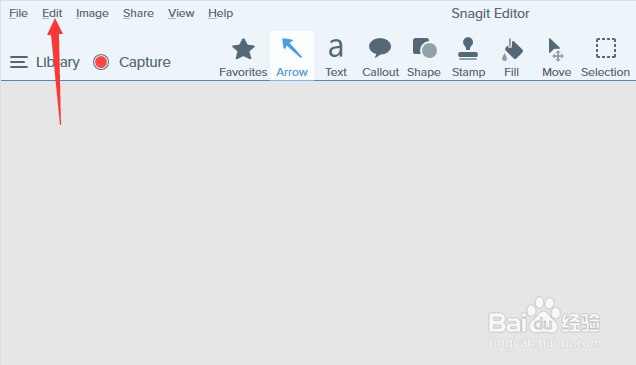
1、首先,点击菜单中的edit菜单

Snagit 2019 Editor怎么关闭启用拼写检查

2、弹出了下拉菜单选中为edit preferences选项

Snagit 2019 Editor怎么关闭启用拼写检查

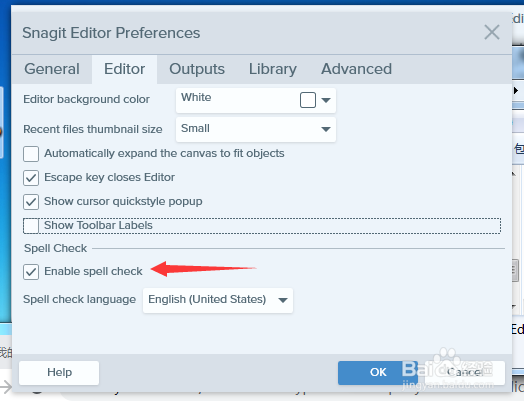
3、去掉勾选上enable spell check选项

Snagit 2019 Editor怎么关闭启用拼写检查

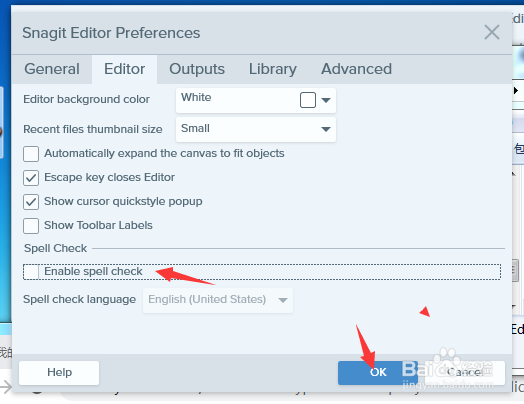
4、去掉勾选上enable spell check选项之后,点击ok按钮

Snagit 2019 Editor怎么关闭启用拼写检查

  • Snagit怎么设置最近的文件缩略图大小为最小
  • Snagit 2019怎么关闭自动展开画布以适合对象
  • Snagit 2019 Editor怎么设置编辑器背景色为白色
  • Snagit 2019 Editor怎么关闭发送匿名使用数据
  • Snagit怎么滚动截屏
  • 热门搜索
    馄饨皮的做法大全 鸭子的做法 铬怎么读 瘦肉的做法 油炸糕的做法家常做法 蜂蜜柠檬水的做法 椰子鸡汤的做法 大螃蟹的做法 凉拌豆腐的做法 玉米的做法