1、打开word2007 ,进入其主界面中;

2、用鼠标点击插入菜单;

3、在工具栏中点击符号;

4、选择其他符号;

5、在子集中点击广义标点;

6、找到并选择摄氏温度符号,然后按插入;
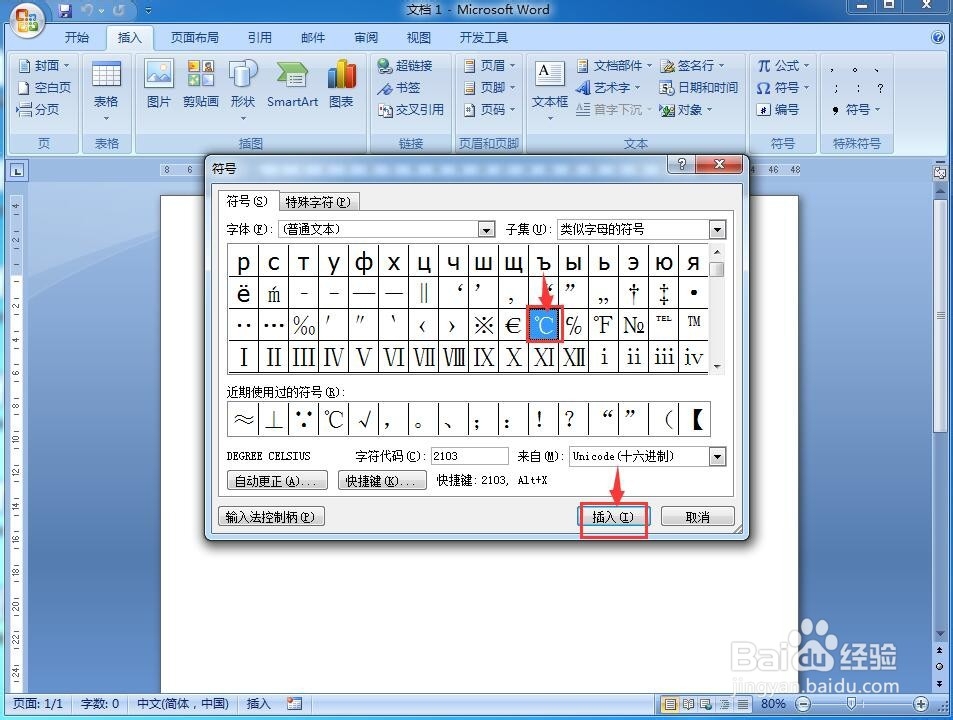
7、我们就在word中插入了一个摄氏温度符号。

时间:2026-05-02 19:22:18
1、打开word2007 ,进入其主界面中;
2、用鼠标点击插入菜单;
3、在工具栏中点击符号;
4、选择其他符号;
5、在子集中点击广义标点;
6、找到并选择摄氏温度符号,然后按插入;
7、我们就在word中插入了一个摄氏温度符号。
