Centos7中英文切换方法

 时间:2026-02-13 20:47:15

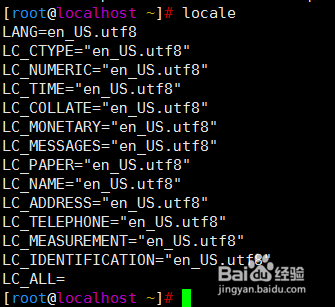
1、locale命令查看系统字符集

Centos7中英文切换方法

2、cat /etc/locale.conf

当前系统为英文字符集,需要切换到中文字符集

Centos7中英文切换方法

3、切换之前先备份配置文件

cp /etc/locale.conf /etc/locale.conf_bak

Centos7中英文切换方法

4、[root@localhost ~]# echo "LANG=zh_CN.utf8" > /etc/locale.conf

[root@localhost ~]# cat /etc/locale.conf

LANG=zh_CN.utf8

Centos7中英文切换方法

5、重启操作系统

reboot

Centos7中英文切换方法

6、切换完成之后测试

Centos7中英文切换方法

7、中文切换到英文字符集

echo "LANG=en_US.utf8" > /etc/locale.conf

Centos7中英文切换方法

8、同样需要重启服务器操作

reboot

Centos7中英文切换方法

9、重启完成继续验证,字符集从中文变回了英文

Centos7中英文切换方法

  • idea背景颜色设置
  • 使用命令如何查看文件的所有者?
  • Java Decompiler怎么用
  • 如何解决VMware上MAC虚拟机不能上网问题
  • C#不安装oracle客户端,如何连接到oracle数据库
  • 热门搜索
    晒伤后怎么处理 对讲机怎么配对 日语哥哥怎么说 红包提醒怎么设置 婴儿舌苔厚白是怎么回事 孩子沉迷游戏怎么办 地震是怎么形成的 茄子怎么做 囊肿是怎么形成的 多囊卵巢怎么治最好



