ulead cool 3d中给文字添加绿色纹理和旋转特效

 时间:2024-11-01 02:26:55

1、打开 ulead cool 3d,进入其主界面;

ulead cool 3d中给文字添加绿色纹理和旋转特效

2、用鼠标点击插入文字;

ulead cool 3d中给文字添加绿色纹理和旋转特效

3、输入文字长长久久,按确定;

ulead cool 3d中给文字添加绿色纹理和旋转特效

4、点击色彩,选择绿色,按确定;

ulead cool 3d中给文字添加绿色纹理和旋转特效

5、点击纹理,添加一种纹理样式;

ulead cool 3d中给文字添加绿色纹理和旋转特效

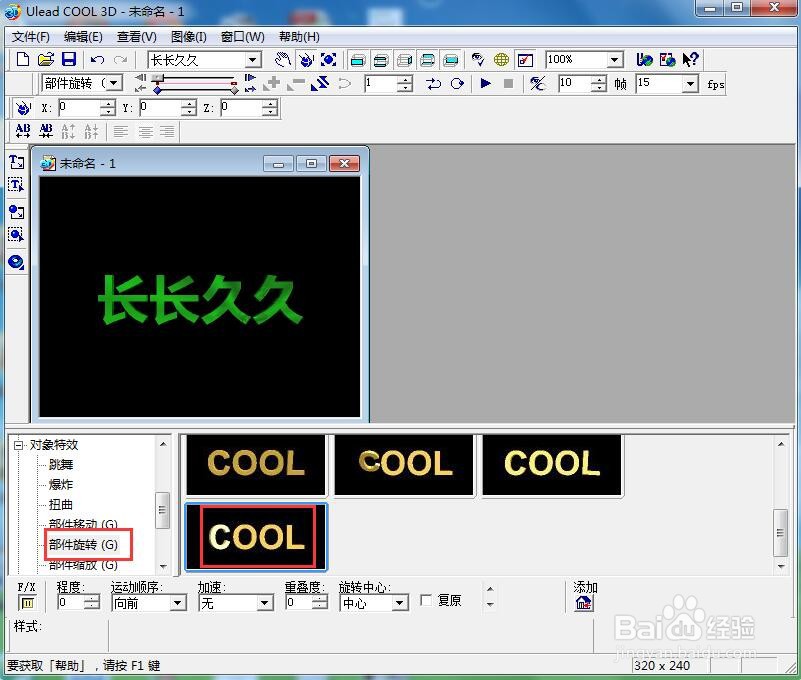
6、点击对象特效,选择部件旋转,添加一种旋转样式;

ulead cool 3d中给文字添加绿色纹理和旋转特效

7、我们就给文字添加上了绿色纹理和旋转特效。

ulead cool 3d中给文字添加绿色纹理和旋转特效
  • ulead cool 3d中给圆环添加绿色纹理和旋转特效
  • ulead cool 3d中给文字添加紫色纹理和旋转特效
  • ulead cool 3d中给文字添加蓝色纹理和旋转特效
  • ulead cool 3d中给文字添加绿色纹理和旋转特效
  • ulead cool 3d中给文字添加纹理和缩放特效
  • 热门搜索
    一什么灯光 什么的屏障 qq空间被挡访客是什么意思 join是什么意思 人走茶凉是什么意思 鬼畜什么意思 观察的近义词是什么 谷丙转氨酶是什么 党的生命是什么 xo什么意思