1、点击“qBittorrent”

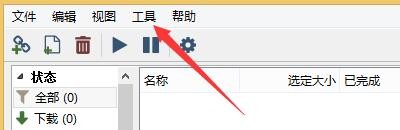
2、在“qBittorrent”窗口中,点击“工具”
3、在弹出下拉栏中,点击“选项”

4、在“选项”窗口中,点击“行为”

5、在“行为”窗口中,勾选“使用qBittorrent打开磁力链接”

6、点击“ok”即可

时间:2024-10-14 19:19:48
1、点击“qBittorrent”
2、在“qBittorrent”窗口中,点击“工具”
3、在弹出下拉栏中,点击“选项”
4、在“选项”窗口中,点击“行为”
5、在“行为”窗口中,勾选“使用qBittorrent打开磁力链接”
6、点击“ok”即可
