PSPad editor怎么关闭在文件尾自动补上

 时间:2024-11-01 02:30:24

1、点击菜单中的设置菜单,弹出了下拉菜单选中为首选项

PSPad editor怎么关闭在文件尾自动补上

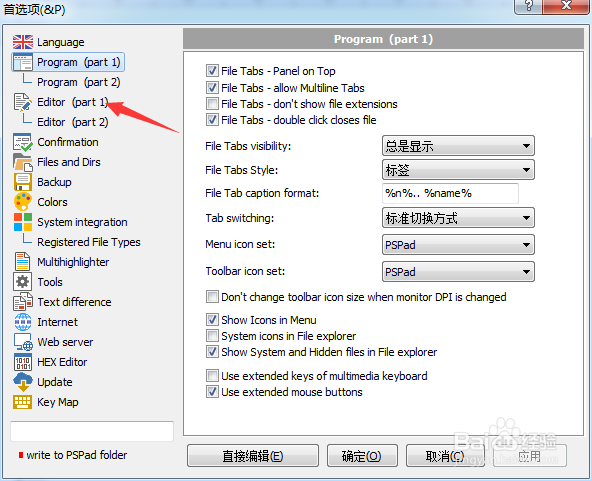
2、点击左侧中editor选项

PSPad editor怎么关闭在文件尾自动补上

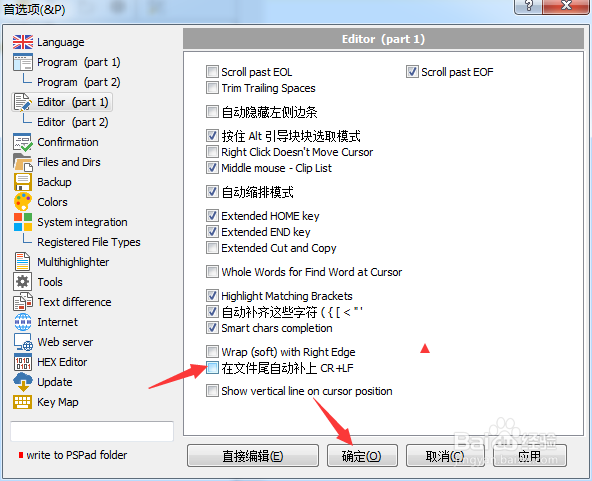
3、去掉勾选上在文件尾自动补上选项

PSPad editor怎么关闭在文件尾自动补上

4、去掉勾选上在文件尾自动补上选项之后,点击确定

PSPad editor怎么关闭在文件尾自动补上
  • PSPad editor怎么关闭智能字符完成
  • PSPad editor怎么关闭扩展端键
  • PSPad editor怎么对代码剪辑关闭
  • PSPad editor怎么关闭自动检查更新
  • PSPad editor怎么开启自动检查更新
  • 热门搜索
    成都美食攻略 痱子怎么办 怎么切换显卡 翼虎怎么样 美食攻略 三国群英传7秘籍怎么用 西安科技大学高新学院怎么样 红烧牛腩的做法 如何快速减肥 广汽本田怎么样