1、打开软件,新建html文件,如图,分析图片的构成部分,是由五张图片,五行字组成。建立五个div布局,每个div包含一张图片一段字。字和图片都有超链接

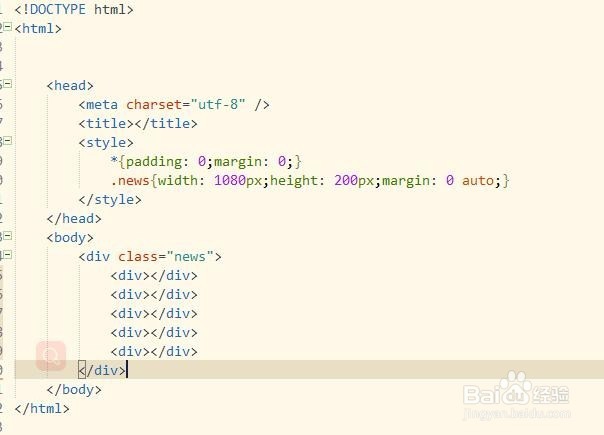
2、建立一个div包含五张图片,设置属性margin :0 auto;上下边界为0,左右相等。建立div5个,放置图片和字。
*{padding: 0;margin: 0;}
.news{width: 1080px;height: 200px;margin: 0 auto;}
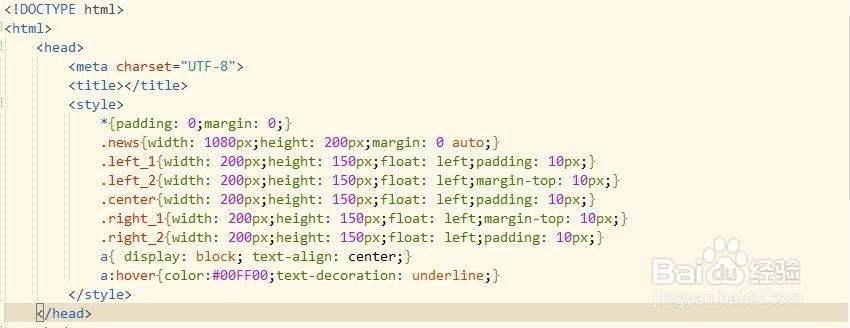
3、.left_1{width: 200px;height: 150px;float: left;padding: 10px;}
.left_2{width: 200px;height: 150px;float: left;margin-top: 10px;}
.center{width: 200px;height: 150px;float: left;padding: 10px;}
.right_1{width: 200px;height: 150px;float: left;margin-top: 10px;}
.right_2{width: 200px;height: 150px;float: left;padding: 10px;}
4、给图片添加超链接
<div class="left_1">
<a href="http://news.baidu.com/" target="_blank"><img src="../img/a.jpg"height="150
<a href="baidu.com" target="_blank">图片链接</a>
</div>
<div class="left_2">
<a href="http://news.baidu.com/" target="_blank"><img src="../img/a1.jpg"height="150
<a href="baidu.com" target="_blank">图片链接</a>
</div>
<div class="center">
<a href="http://news.baidu.com/" target="_blank"><img src="../img/a3.jpg"height="150
<a href="baidu.com" target="_blank">图片链接</a>
</div>
<div class="right_1">
<a href="http://news.baidu.com/" target="_blank"><img src="../img/day02.jpg"height="150
<a href="baidu.com" target="_blank">图片链接</a>
</div>
<div class="right_2">
<a href="http://news.baidu.com/" target="_blank"><img src="../img/qiu.gif"height="150
<a href="baidu.com" target="_blank">图片链接</a>
</div>

5、图片和字都加超链接。运行看一下效果。

6、<!DOCTYPE html>
<html>
<head>
<meta charset="utf-8" />
<title></title>
<style>
*{padding: 0;margin: 0;}
.news{width: 1080px;height: 200px;margin: 0 auto;}
.left_1{width: 200px;height: 150px;float: left;padding: 10px;}
.left_2{width: 200px;height: 150px;float: left;margin-top: 10px;}
.center{width: 200px;height: 150px;float: left;padding: 10px;}
.right_1{width: 200px;height: 150px;float: left;margin-top: 10px;}
.right_2{width: 200px;height: 150px;float: left;padding: 10px;}
a{ display: block; text-align: center;}
a:hover{color:#00FF00;text-decoration: underline;}
</style>
</head>
<body>
<div class="news">
<div class="left_1">
<a href="http://news.baidu.com/" target="_blank"><img src="../img/a.jpg"height="150
<a href="baidu.com" target="_blank">图片链接</a>
</div>
<div class="left_2">
<a href="http://news.baidu.com/" target="_blank"><img src="../img/a1.jpg"height="150
<a href="baidu.com" target="_blank">图片链接</a>
</div>
<div class="center">
<a href="http://news.baidu.com/" target="_blank"><img src="../img/a3.jpg"height="150
<a href="baidu.com" target="_blank">图片链接</a>
</div>
<div class="right_1">
<a href="http://news.baidu.com/" target="_blank"><img src="../img/day02.jpg"height="150
<a href="baidu.com" target="_blank">图片链接</a>
</div>
<div class="right_2">
<a href="http://news.baidu.com/" target="_blank"><img src="../img/qiu.gif"height="150
<a href="baidu.com" target="_blank">图片链接</a>
</div>
</div>
</body>
</html>
所有代码,细节自行添加
