1、在PowerPoint软件中,找到咱们的切换选项。

2、然后,我们就能在这里找到切换到此幻灯片的选项。

3、因此我们就能够在这里使用淡入和淡出切换效果。

4、这时候,咱们也能在这里设置淡入和淡出的效果选项。
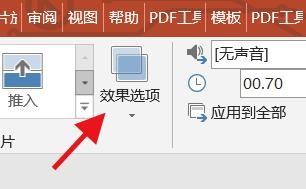
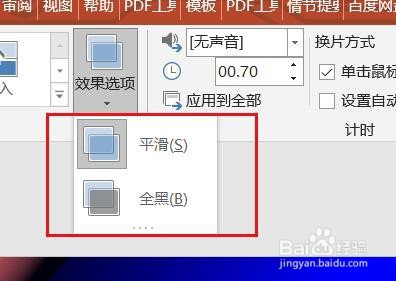
5、点击效果选项,即可在这里下拉设置效果的选项样式。
时间:2026-04-26 18:58:43
1、在PowerPoint软件中,找到咱们的切换选项。
2、然后,我们就能在这里找到切换到此幻灯片的选项。
3、因此我们就能够在这里使用淡入和淡出切换效果。
4、这时候,咱们也能在这里设置淡入和淡出的效果选项。
5、点击效果选项,即可在这里下拉设置效果的选项样式。
