1、创建窗口0,并拖拽3个按钮
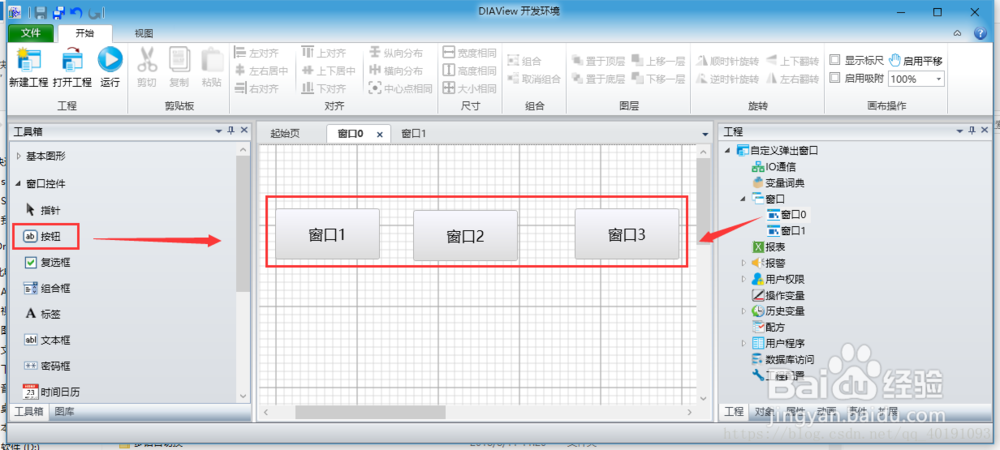
2、创建窗口1,设置属性“背景”,“大小”

3、创建变量,ButtonNumber 用于标记属于哪个按钮执行的窗口

4、对应的脚本脚本事件如下:
1、窗口0 ==> 按钮“窗口1”==>事件==>左键按下
width=按钮0.Width
height=按钮0.Height
leftValue=按钮0.Left+width
topValue=按钮0.Top+height
Var.ButtonNumber=1
Call HMICmd.OpenDialogWindow("窗口1",1,true,leftValue,topValue)
2、窗口0 ==> 按钮“窗口2”==>事件==>左键按下
width=按钮1.Width
height=按钮1.Height
leftValue=按钮1.Left+width
topValue=按钮1.Top+height
Var.ButtonNumber=2
Call HMICmd.OpenDialogWindow("窗口1",1,true,leftValue,topValue)
3、窗口0 ==> 按钮“窗口3”==>事件==>左键按下
width=按钮2.Width
height=按钮2.Height
leftValue=按钮2.Left+width
topValue=按钮2.Top+height
Var.ButtonNumber=3
Call HMICmd.OpenDialogWindow("窗口1",1,true,leftValue,topValue)
4、窗口1 ==> 按钮“确定”==>事件==>左键按下
If Var.ButtonNumber=1 then
MsgBox "执行按钮1需要的动作"
HMICmd.CloseDialogWindow()
End If
If Var.ButtonNumber=2 then
MsgBox "执行按钮2需要的动作"
HMICmd.CloseDialogWindow()
End If
If Var.ButtonNumber=3 then
MsgBox "执行按钮3需要的动作"
HMICmd.CloseDialogWindow()
End If
5、窗口1 ==> 按钮“关闭”==>事件==>左键按下
HMICmd.CloseDialogWindow()
5、点击“运行”按钮,查看运行效果

