英文版Server2012域控如何查看Functional Level

 时间:2026-02-16 01:57:25

1、开启一台Server 2012域控,点击开始菜单按钮;

英文版Server2012域控如何查看Functional Level

2、系统开始菜单自动打开;

英文版Server2012域控如何查看Functional Level

3、点击开始菜单中,向下的箭头;

英文版Server2012域控如何查看Functional Level

4、Apps页面自动打开;

英文版Server2012域控如何查看Functional Level

5、点击Active Directory Domains and Trusts图标;

英文版Server2012域控如何查看Functional Level

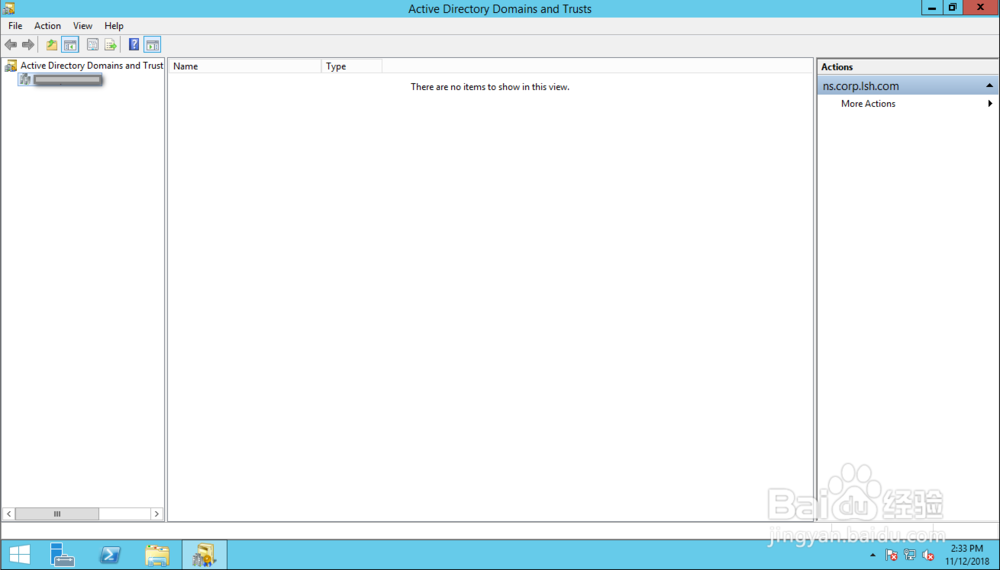
6、Active Directory Domains and Trust窗口自动打开;
英文版Server2012域控如何查看Functional Level

7、找到对应的域右击,点击右击菜单中的“Raise Domain  Functional Level”;

英文版Server2012域控如何查看Functional Level

8、在弹出的Raise Domain  Functional Level对话框中,即可查看到现在的域等级。

英文版Server2012域控如何查看Functional Level

  • Hyper-v中server2012如何设定网络
  • windows server2012 更新配置
  • SQL server2012 连接时出现无法连接到.。
  • 怎么安装windows server2012?
  • 在server2012上搭建DNS服务器
  • 热门搜索
    色彩搭配图 庶女攻略小说 常州旅游景点攻略 短靴搭配 罗曼罗兰简介 长白山攻略 打造世界攻略 放牛班的春天简介 蝶之毒华之锁攻略 六级听力怎么练