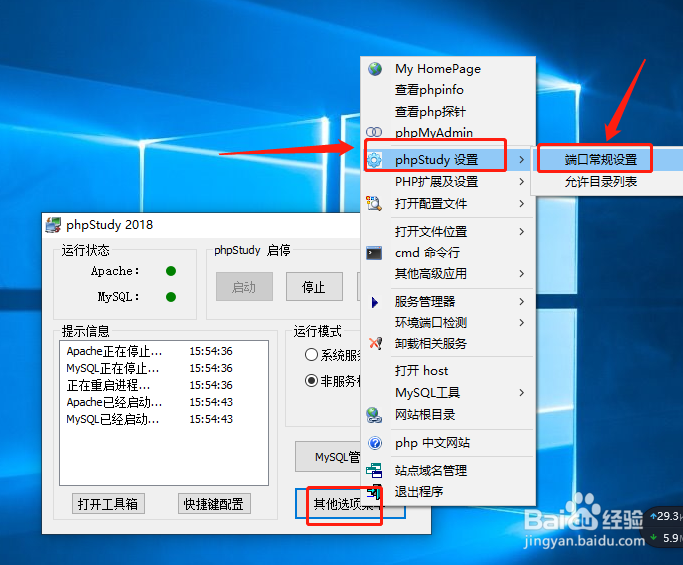
1、打开电脑的上的phpStudy软件,点击“其他选项菜单”

2、在弹出的窗口选择“phpstudy设置”,然后点击“端口常规设置”
3、弹出的窗口可以看到自己的端口号,需要修改端口,那么在这里进行修改,例如默认的是80,可以修改为8080,那么在里面输入,然后选择“应用”即可。
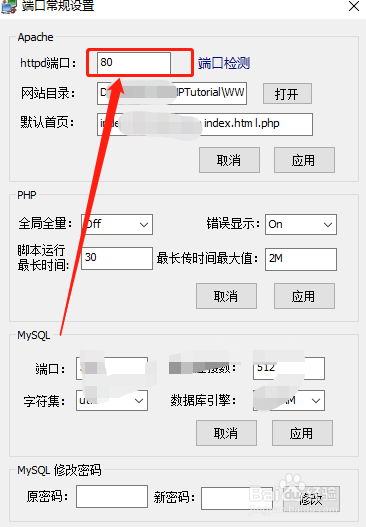

4、在此页面还可以修改MySQL的端口和密码,修改之后应用即可生效

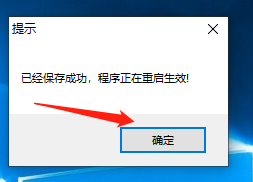
5、修改完成之后,重启phpStudy

6、此时打开你的网页就是刚刚改的端口号

时间:2026-04-28 22:35:33
1、打开电脑的上的phpStudy软件,点击“其他选项菜单”
2、在弹出的窗口选择“phpstudy设置”,然后点击“端口常规设置”
3、弹出的窗口可以看到自己的端口号,需要修改端口,那么在这里进行修改,例如默认的是80,可以修改为8080,那么在里面输入,然后选择“应用”即可。
4、在此页面还可以修改MySQL的端口和密码,修改之后应用即可生效
5、修改完成之后,重启phpStudy
6、此时打开你的网页就是刚刚改的端口号
