PotPlayer怎么将AC3流作为trueHD处理设置

 时间:2026-04-30 18:10:59

1、点击左上角中更多选项

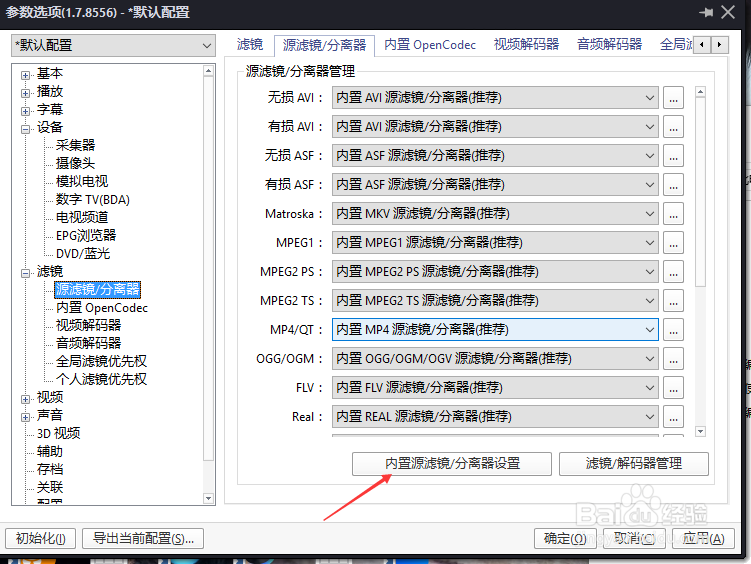
PotPlayer怎么将AC3流作为trueHD处理设置

2、弹出了下拉菜单选择选项

PotPlayer怎么将AC3流作为trueHD处理设置

3、点击左侧中的分离器选项

PotPlayer怎么将AC3流作为trueHD处理设置

4、点击内置管理器选项

PotPlayer怎么将AC3流作为trueHD处理设置

5、勾选将AC3流作为trueHD处理

PotPlayer怎么将AC3流作为trueHD处理设置

6、勾选将AC3流作为trueHD处理之后,点击确定

PotPlayer怎么将AC3流作为trueHD处理设置

  • PotPlayer怎么设置TrueHD数据预读
  • 主板电池扣下来多久恢复出厂设置
  • 艾尔登法环如何双持?
  • Windows11如何键盘的驱动程序列表
  • 怎么打开注册表
  • 热门搜索
    武功秘籍大全招式图 打屁股视频大全 植物大全 耳朵出血怎么回事 word怎么打钩 小学生笑话大全 食物相克大全 中通快递速度怎么样 淘宝头像图片大全 生完孩子怎么减肚子