1、打开steam客户端,点击界面左上角的“steam”按钮。

2、在下拉列表中,选择“settings”选项。

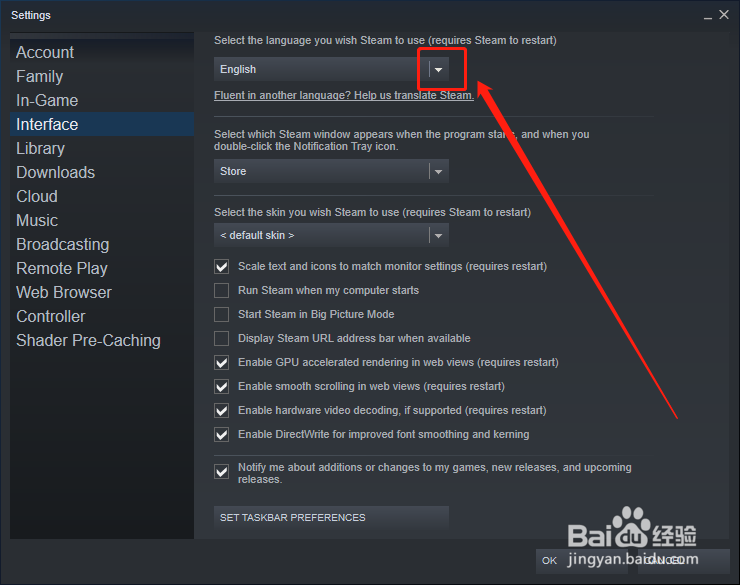
3、在弹出的设置界面中,点击左侧“Interface”按钮。

4、在界面设置中,上面第一项就是语言选择,我们点击下拉按钮。
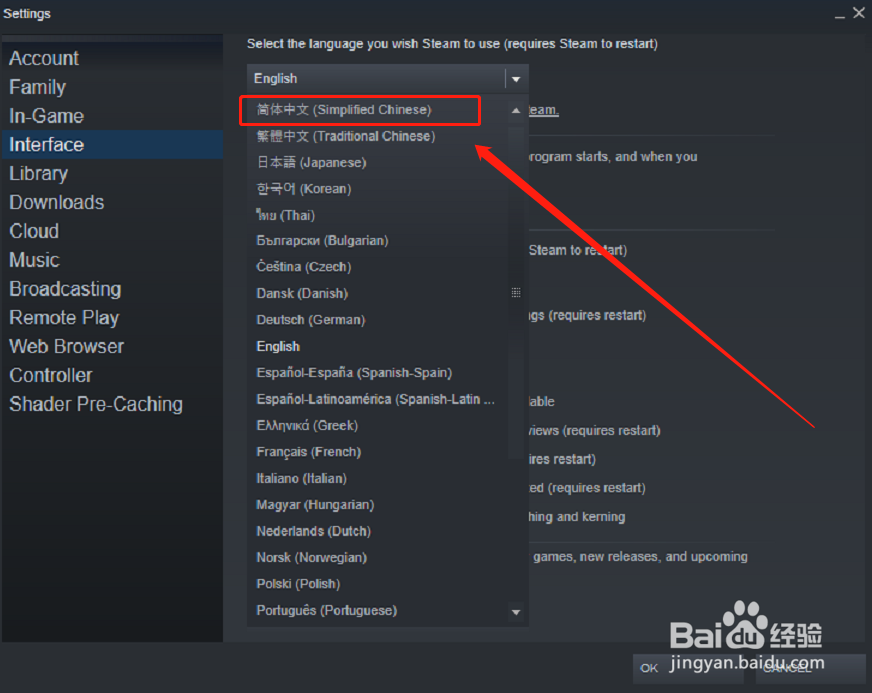
5、在下拉列表中,选择“简体中文”。
6、设置完成后,点击下方“ok”按钮。

7、此时,软件会提醒我们重启客户端,点击“restart steam”进行重启。

8、重启之后,steam客户端界面语言就变成中文了。

时间:2026-04-23 19:36:21
1、打开steam客户端,点击界面左上角的“steam”按钮。
2、在下拉列表中,选择“settings”选项。
3、在弹出的设置界面中,点击左侧“Interface”按钮。
4、在界面设置中,上面第一项就是语言选择,我们点击下拉按钮。
5、在下拉列表中,选择“简体中文”。
6、设置完成后,点击下方“ok”按钮。
7、此时,软件会提醒我们重启客户端,点击“restart steam”进行重启。
8、重启之后,steam客户端界面语言就变成中文了。
