PSPad editor怎么开启显示启动屏幕

 时间:2024-10-31 04:44:38

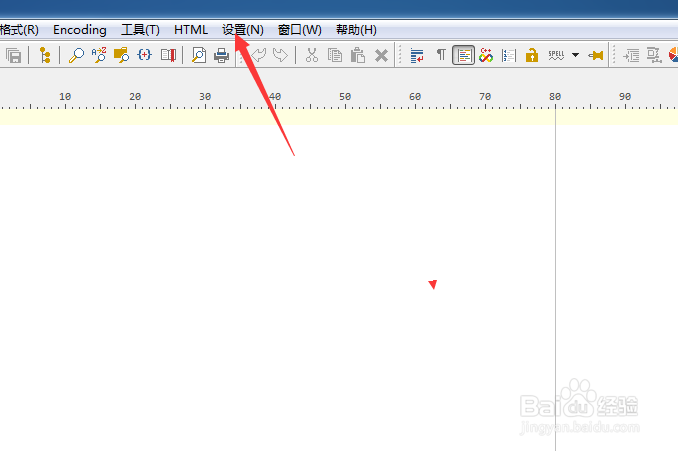
1、点击菜单中设置菜单

PSPad editor怎么开启显示启动屏幕

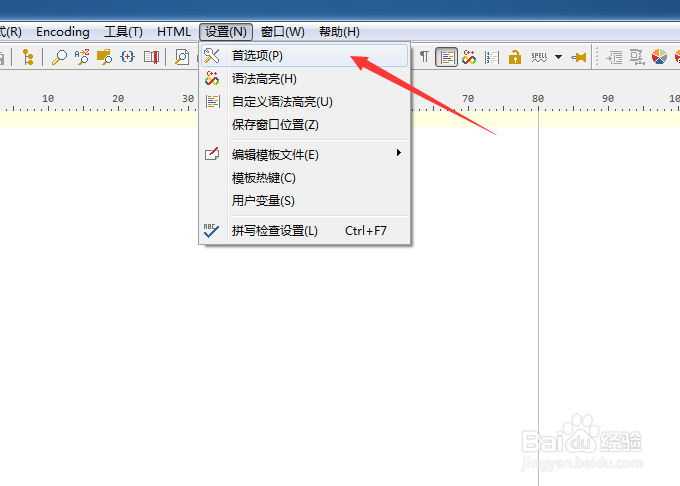
2、弹出了下拉菜单选择首选项

PSPad editor怎么开启显示启动屏幕

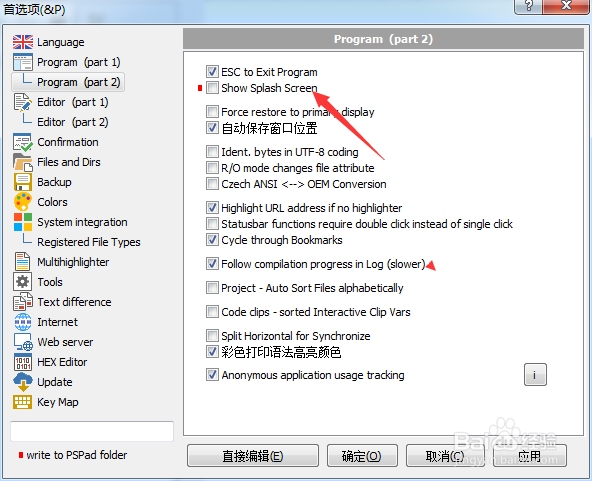
3、点击左侧中的program选项

PSPad editor怎么开启显示启动屏幕

4、勾选show splash screen选项

PSPad editor怎么开启显示启动屏幕

5、勾选show splash screen选项之后,点击确定

PSPad editor怎么开启显示启动屏幕
  • PSPad editor怎么工具栏图标集为pspad
  • PSPad editor怎么菜单图标集为PSpad
  • PSPad editor怎么关闭显示启动屏幕
  • PSPad editor怎么开启esc退出程序
  • PSPad editor怎么开启记住文件状态
  • 热门搜索
    清溪镇在哪里 美国旅游胜地 如何申请微信公众号 朋友圈推广一天30元 新加坡留学怎么样 手起皮是怎么回事 马尔代夫在哪里 魔音耳机怎么样 如何盘手串 笔记本触摸板怎么设置