PSPad editor怎么设置代码剪辑

 时间:2024-10-31 04:44:49

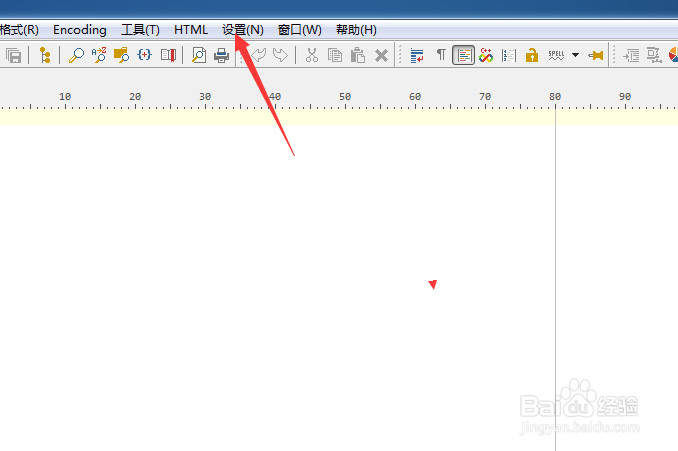
1、点击菜单中的设置菜单

PSPad editor怎么设置代码剪辑

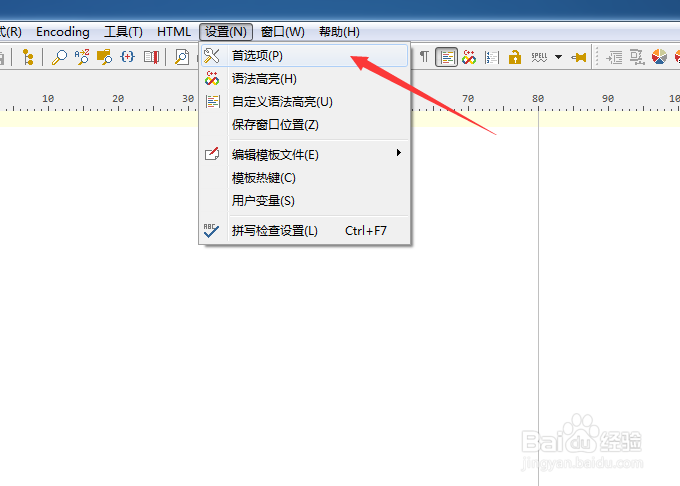
2、弹出了下拉菜单选中为首选项

PSPad editor怎么设置代码剪辑

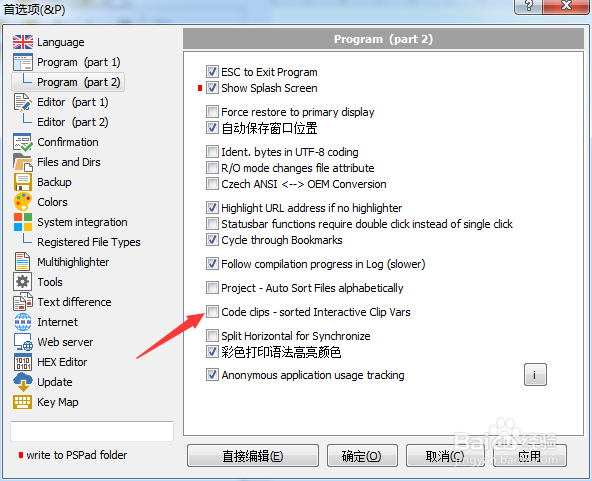
3、点击左侧中program选项

PSPad editor怎么设置代码剪辑

4、勾选上code clips选项

PSPad editor怎么设置代码剪辑

5、勾选上code clips选项之后,点击确定

PSPad editor怎么设置代码剪辑
  • PSPad editor怎么设置搜索结果为置中
  • PSPad editor怎么关闭pspad前显示确认对话框
  • PSPad editor怎么设置集成脚本支持
  • PSPad editor怎么对代码剪辑关闭
  • PSPad editor怎么设置标签宽度
  • 热门搜索
    wlan怎么改密码 春纪护肤品怎么样 急用钱怎么办 北京科技大学怎么样 蛇怎么交配 tcl电视怎么样 怀孕时间怎么算 投诉信怎么写 手机死机怎么办 会怎么读