1、首先需要打开桌面上的word,在顶端有一个下拉箭头,点击打开下拉菜单。
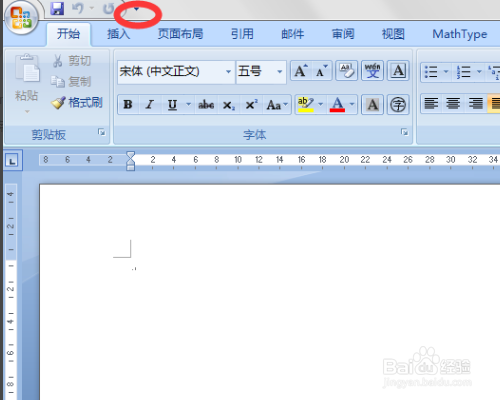
2、在打开的自定义快速访问工具栏里选择“其他命令”。

3、在打开的“word选项”对话框中选择“信任中心”。
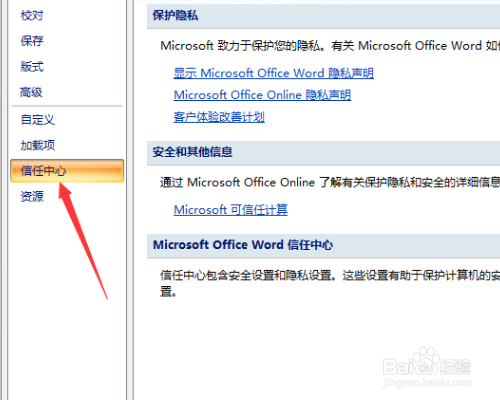
4、在右边的窗口中内点击“信任中心设置”。

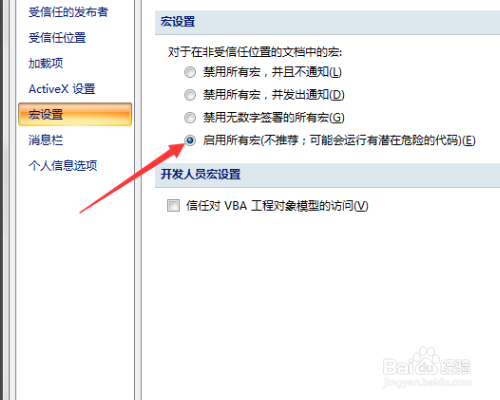
5、在打开的“信任中心”对话框中选择“宏设置”。

6、在“宏设置”选项中选择:“启用所有宏”,点击“确定”按钮。
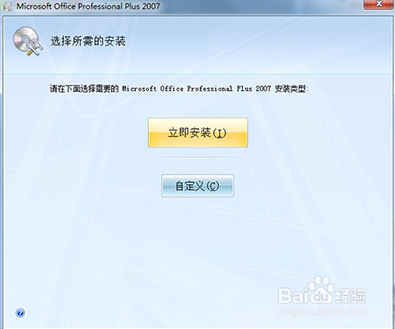
7、如果还是不可以建议直接从新安装,同时建议找一个比较完整的版本。
时间:2026-05-06 23:28:32
1、首先需要打开桌面上的word,在顶端有一个下拉箭头,点击打开下拉菜单。
2、在打开的自定义快速访问工具栏里选择“其他命令”。
3、在打开的“word选项”对话框中选择“信任中心”。
4、在右边的窗口中内点击“信任中心设置”。
5、在打开的“信任中心”对话框中选择“宏设置”。
6、在“宏设置”选项中选择:“启用所有宏”,点击“确定”按钮。
7、如果还是不可以建议直接从新安装,同时建议找一个比较完整的版本。
