1、打开腾讯电脑管家,在左侧目录栏找到【软件管理】,点击鼠标左键确认

2、在【软件管理】左侧目录栏中找到【宝库】

3、在全部软件分类中找到【图片】,点击鼠标左键确认

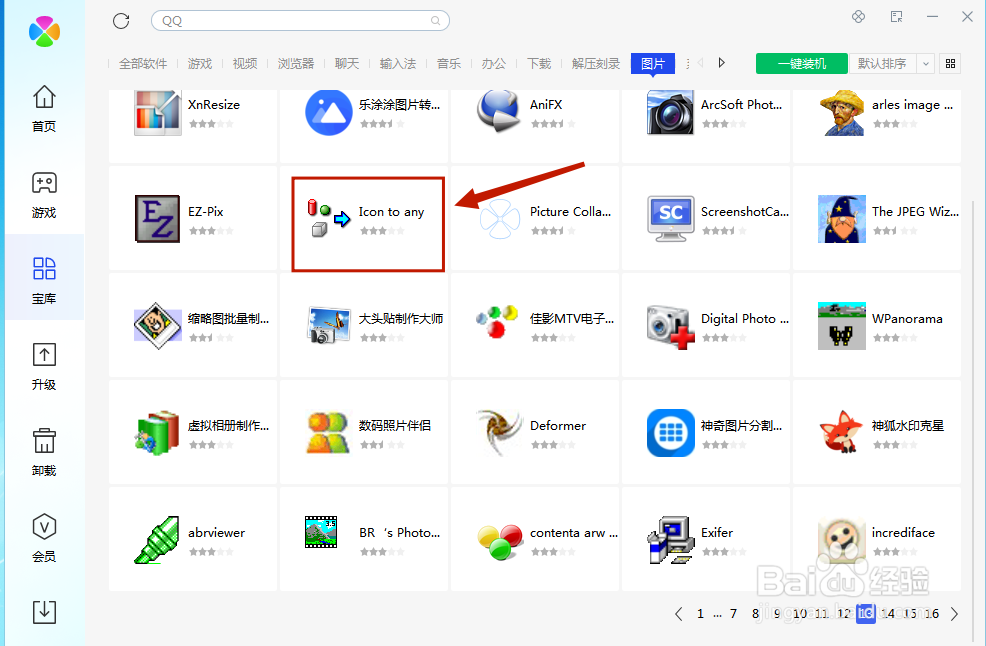
4、在【图片】软件库中,找打【Icon to any 】,点击鼠标左键并一键安装
时间:2026-04-29 22:40:27
1、打开腾讯电脑管家,在左侧目录栏找到【软件管理】,点击鼠标左键确认
2、在【软件管理】左侧目录栏中找到【宝库】
3、在全部软件分类中找到【图片】,点击鼠标左键确认
4、在【图片】软件库中,找打【Icon to any 】,点击鼠标左键并一键安装
