shutting down interface eth0

 时间:2026-02-15 02:38:46

1、使用service network restart启动Linux网卡失败,提示shutting down interface eth0 Error this device is not active

shutting down interface eth0

2、遇到这个问题的解决办法是运行下面的命令行

chconfig NetworkManager on

然后运行下面的命令

service  network restart
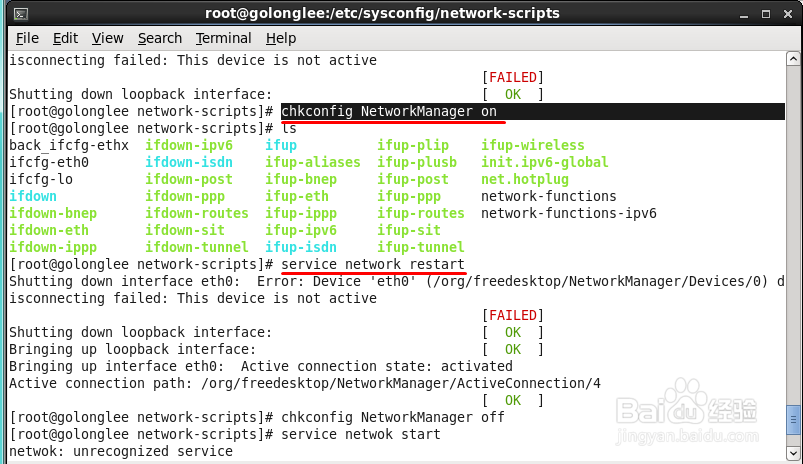
shutting down interface eth0

3、如果还是failed,则运行下面的命令

chkconfig NetworkManager off

然后运行下面的命令

service network start

这里可以看到网卡启动成功了
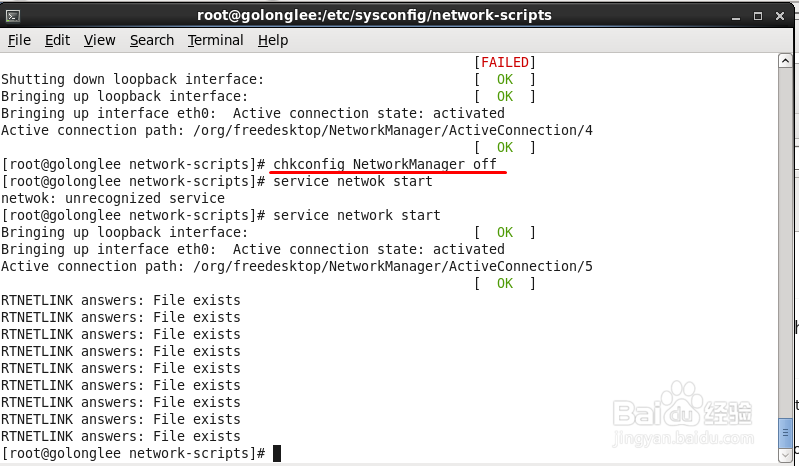
shutting down interface eth0

4、如果对你有帮助,请给点个赞。

shutting down interface eth0

  • win11怎么修改wifi热点名字和密码
  • 怎样使用腾讯电脑管家对电脑进行全面体检
  • 打开ps cc时出现由于找不到MSVCP.dll怎么办
  • 路由器修改wifi密码或重置后连不上网怎么办?
  • win10系统怎么查看笔和触控?
  • 热门搜索
    骨头用英语怎么说 老年人失眠怎么办 赵丽颖怎么当上演员的 不知该怎么称呼你 咽喉炎干咳怎么办 入党介绍人意见怎么写 怎么样练腹肌 博伦博格冰箱怎么样 户籍性质怎么填 chloe怎么读