1、服务器管理器-->配置-->高级安全windows防火墙-->入站规则,进行新建规则。

2、规则类型 选择 端口
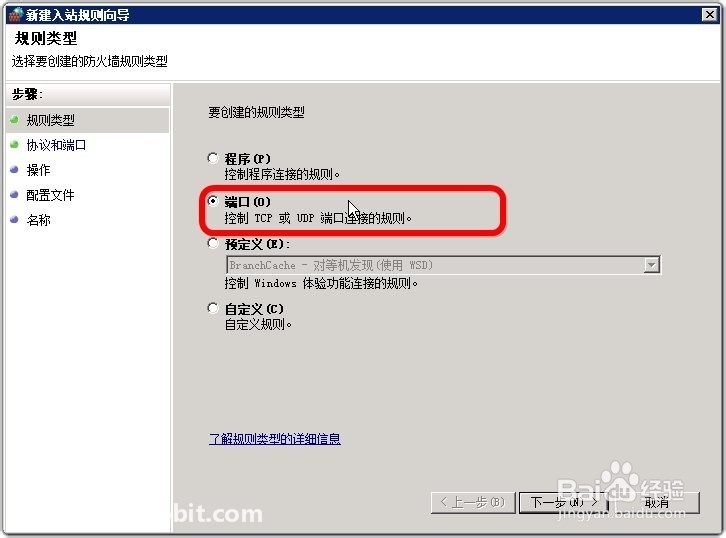
3、选择TCP,然后指定端口。

4、操作设置为 允许连接

5、设置 域、专用、公用 均应用该规则。

6、然后为该端口起个名。

1、感谢您把本经验阅读完,如果有写的不好的地方,请指出以便纠正,以免误人子弟。
如果觉得本经验有用,浪费您几秒钟的时间在页面左下方点个赞。在页面顶部/经验底部投个票。
您的支持是我不断写经验的动力!
时间:2026-04-30 18:02:24
1、服务器管理器-->配置-->高级安全windows防火墙-->入站规则,进行新建规则。
2、规则类型 选择 端口
3、选择TCP,然后指定端口。
4、操作设置为 允许连接
5、设置 域、专用、公用 均应用该规则。
6、然后为该端口起个名。
1、感谢您把本经验阅读完,如果有写的不好的地方,请指出以便纠正,以免误人子弟。
如果觉得本经验有用,浪费您几秒钟的时间在页面左下方点个赞。在页面顶部/经验底部投个票。
您的支持是我不断写经验的动力!
