如何在FastStoneViewer程序中按Esc键停止播放

 时间:2026-02-14 14:20:42

1、点击“FastStoneImageViewer”

如何在FastStoneViewer程序中按Esc键停止播放

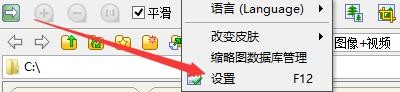
2、在“FastStoneImageViewer”窗口中,点击“设置”

如何在FastStoneViewer程序中按Esc键停止播放

3、在弹出下拉栏中,再次点击“设置”

如何在FastStoneViewer程序中按Esc键停止播放

4、在“设置”窗口中,点击“视频文件”

如何在FastStoneViewer程序中按Esc键停止播放

5、在“视频文件”窗口中,勾选“按Esc键停止播放”

如何在FastStoneViewer程序中按Esc键停止播放

6、点击“确定”即可

如何在FastStoneViewer程序中按Esc键停止播放

  • FastStoneViewer如何在全屏模式不显示鼠标沙漏
  • FastStoneViewer如何启用详细信息浏览模式
  • 如何设置FastStoneViewer更改放大镜放大比例
  • FastStoneViewer读取图像如何重置位置到(0,0)
  • FastStoneViewer如何启用自动锁定缩放比例图像
  • 热门搜索
    取名字大全 韩信简介 陶华碧简介 鲫鱼的做法大全 wps怎么画流程图 小键盘怎么开 经典作文大全 帮派名字大全霸气 淘宝优惠券怎么用 怎么屏蔽网站