电脑用久了是不是变得很慢很卡啊?我这里有个小技巧供大家交流!!
@echo off
echo 正在清理系统垃圾文件,请稍等......del /f /s /q %systemdrive%\*.tmpdel /f /s /q %systemdrive%\*._mpdel /f /s /q %systemdrive%\*.logdel /f /s /q %systemdrive%\*.giddel /f /s /q %systemdrive%\*.chkdel /f /s /q %systemdrive%\*.olddel /f /s /q %systemdrive%\recycled\*.*del /f /s /q %windir%\*.bakdel /f /s /q %windir%\prefetch\*.*rd /s /q %windir%\temp & md %windir%\tempdel /f /q %userprofile%\cookies\*.*del /f /q %userprofile%\recent\*.*del /f /s /q "%userprofile%\Local Settings\Temporary Internet Files\*.*"del /f /s /q "%userprofile%\Local Settings\Temp\*.*"del /f /s /q "%userprofile%\recent\*.*"echo 清理系统垃圾完成!echo
把上述命令粘贴在记事本内,然后另存为文件格式为.bat的文件;
平时电脑如果经常用,最好每天运行一次,如果嫌麻烦的话,可以设置成开机运行,步骤如下:
1:左击开始---所有程序---启动---右击启动---选择“打开所有用户”
2:把保存好的bat放在非系统盘内,然后将bat文件的快捷方式拖入“打开所有用户”的界面内;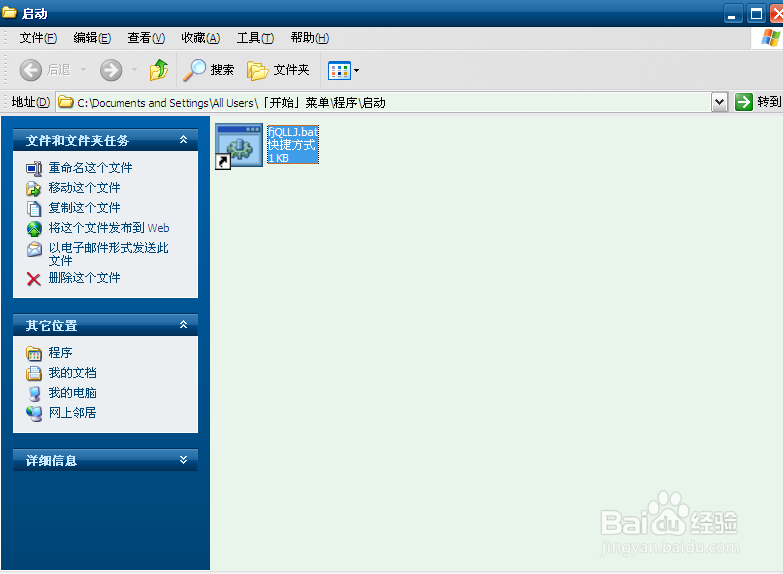
在下次开机的时候系统就会自动清理垃圾了!!
注:以上命令只针对XP系统!!
