SmartSystemMenu自定义窗口大小如何设置

 时间:2026-04-23 11:04:50

1、鼠标右击SmartSystemMenu图标按钮,在弹出菜单中的选择“设置”按钮。

SmartSystemMenu自定义窗口大小如何设置

2、鼠标点击菜单选项按钮。

SmartSystemMenu自定义窗口大小如何设置

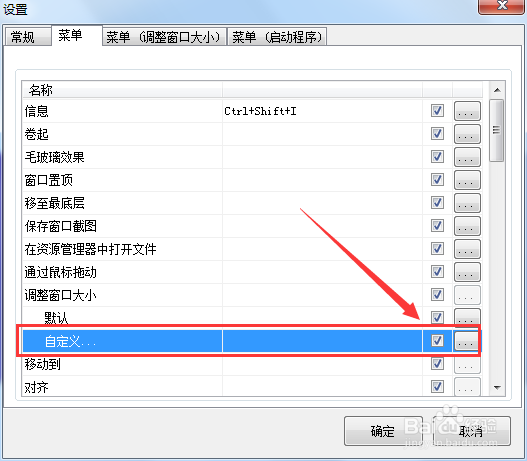
3、勾选方框中的选项即可开启SmartSystemMenu自定义窗口大小。

SmartSystemMenu自定义窗口大小如何设置

  • SmartSystemMenu如何添加新的进程
  • SmartSystemMenu窗口中怎么加入通过鼠标拖动
  • SmartSystemMenu怎么卷起窗口
  • SmartSystemMenu窗口置顶怎么开启
  • SmartSystemMenu中的进程怎么删除
  • 热门搜索
    草莓的英文怎么写 怎么写现代诗 鱼怎么做才好吃 关节痛怎么办 变速自行车怎么变速 情书怎么写最感动人 圣诞节英文怎么写 音调怎么打 樊文花面膜怎么样 干咳嗽怎么办