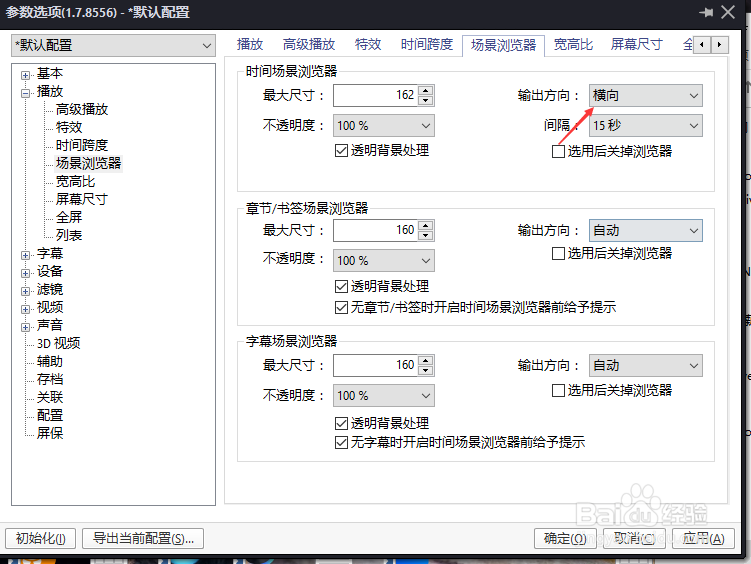
PotPlayer怎么输出放下设置为纵向

 时间:2026-02-14 09:51:53

1、打开一个PotPlayer的界面中

PotPlayer怎么输出放下设置为纵向

2、点击左上角更多菜单

PotPlayer怎么输出放下设置为纵向

3、弹出了下拉菜单选中选项

PotPlayer怎么输出放下设置为纵向

4、点击左侧中场景浏览器选项

PotPlayer怎么输出放下设置为纵向

5、点击输出方向选项

PotPlayer怎么输出放下设置为纵向

6、弹出了下拉菜单选中纵向选项

PotPlayer怎么输出放下设置为纵向

7、选中纵向选项之后,点击确定

PotPlayer怎么输出放下设置为纵向

  • Windows 10操作系统限制配置文件大小
  • 彩虹岛血脉活动教你如何轻松拿到3000W+的血脉
  • 菜鸟APP怎么设置其手机系统权限
  • Opera怎么让书签栏显示出来
  • 明日之后多贝雪山探索宝箱位置一览
  • 热门搜索
    脸上起红疙瘩怎么回事 诉状怎么写 我的世界猪怎么驯服 湖南师范大学怎么样 皮肤黑怎么变白 小茴香怎么吃 牛排怎么吃 文件怎么加密 椰子油怎么吃 生蚝怎么洗