1、首先,原本自带的终端效果如图。暗紫色背景,没有半透明效果。

2、在Terminal的菜单(上边)找到Preferences设置,打开如图。

3、切换到Preferences的Profiles面板,选中默认的项目,点击Edit。打开编辑框。

4、切换都Colors面板,勾选use transparent background,设置不透明度。
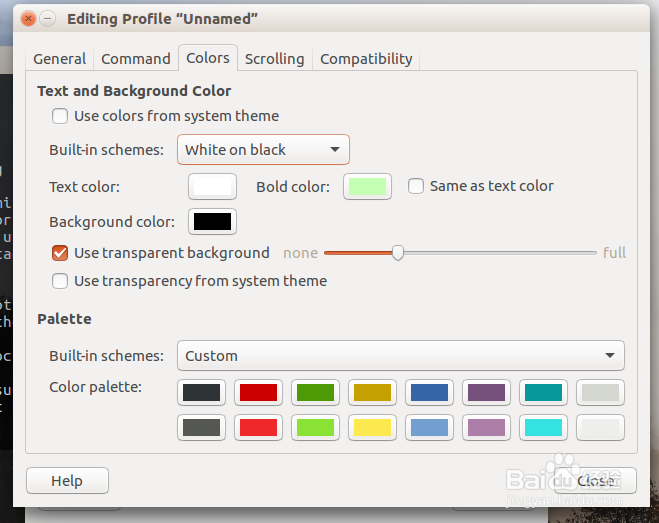
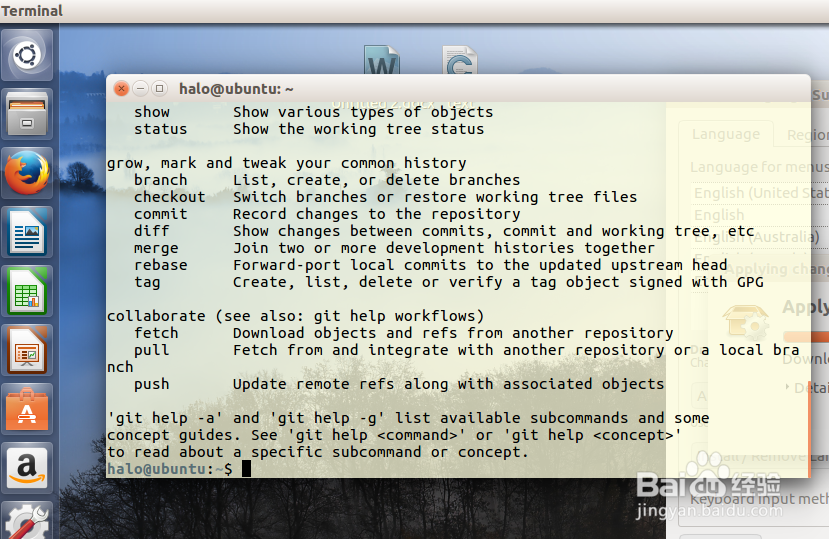
5、也可以直接切换buid-in schemes,如图,换了一个比较明亮的主题色。
时间:2026-04-22 12:37:33
1、首先,原本自带的终端效果如图。暗紫色背景,没有半透明效果。
2、在Terminal的菜单(上边)找到Preferences设置,打开如图。
3、切换到Preferences的Profiles面板,选中默认的项目,点击Edit。打开编辑框。
4、切换都Colors面板,勾选use transparent background,设置不透明度。
5、也可以直接切换buid-in schemes,如图,换了一个比较明亮的主题色。
