如何设置Exposure X6使用全屏窗口显示模式

 时间:2026-02-16 05:57:20

1、点击“Exposure x6”

如何设置Exposure X6使用全屏窗口显示模式

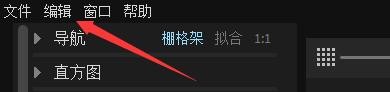
2、在“Exposure x6”窗口中,点击“编辑”

如何设置Exposure X6使用全屏窗口显示模式

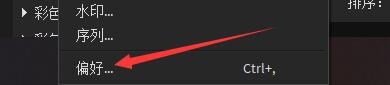
3、在弹出下拉栏中,点击“偏好”

如何设置Exposure X6使用全屏窗口显示模式

4、在“偏好”窗口中,点击“窗口”

如何设置Exposure X6使用全屏窗口显示模式

5、在“窗口”窗口中,将“全屏”勾选上

如何设置Exposure X6使用全屏窗口显示模式

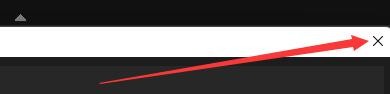
6、点击“关闭”窗口即可

如何设置Exposure X6使用全屏窗口显示模式

  • 怎样修改exposure的磁盘缓存?
  • exposure to 的用法
  • 如何设置Exposure X6显示悬停帮助
  • 如何设置Exposure X6使用滚轮调整悬停滑块
  • Exposure X6如何使用滚轮调整笔刷大小
  • 热门搜索
    百度推广怎么做 ds6怎么样 如何查询银行卡的余额 梦想生活 三年级作文我的课余生活 如何提高身高 我待生活如初恋 如何购买私募基金 陀螺世界怎么玩 proposal怎么写