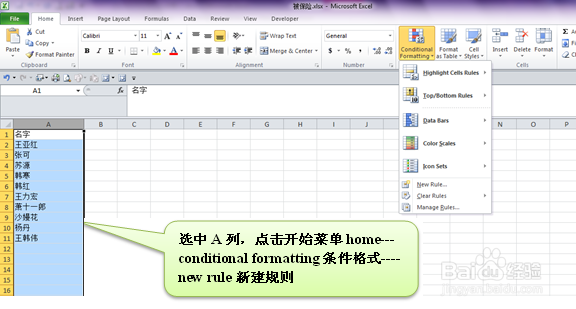
1、选中A列,点击开始菜单home---conditional formatting条件格式----new rule新建规则
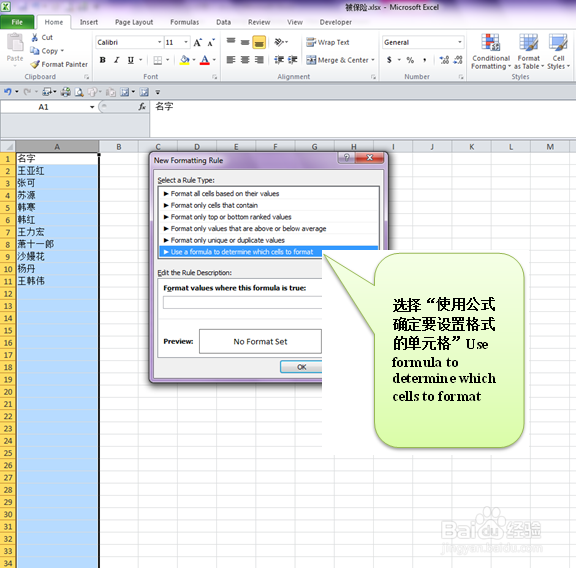
2、选择“使用公式确定要设置格式的单元格”Use formula to determine which cells to format
3、在“为符合此公式的值设置格式”那里输入公式=search("韩",INDIRECT("A"&ROW()))

4、单击格式format----打开单元格格式对话框,单击填充fill----选择橙色,单击确定OK

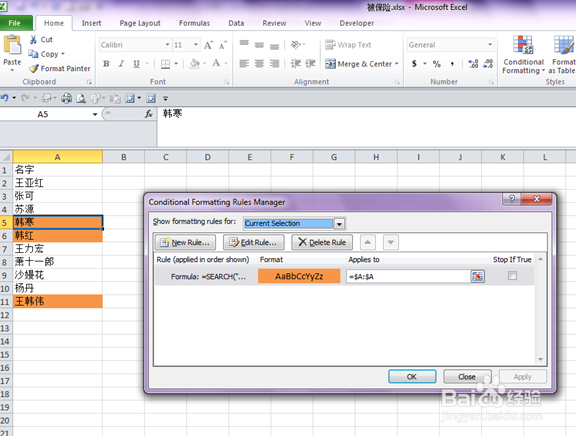
5、最后结果如下截屏。
时间:2026-04-22 17:28:03
1、选中A列,点击开始菜单home---conditional formatting条件格式----new rule新建规则
2、选择“使用公式确定要设置格式的单元格”Use formula to determine which cells to format
3、在“为符合此公式的值设置格式”那里输入公式=search("韩",INDIRECT("A"&ROW()))
4、单击格式format----打开单元格格式对话框,单击填充fill----选择橙色,单击确定OK
5、最后结果如下截屏。
