DzSoft PHP Editor怎么关闭光标超出eof

 时间:2024-10-31 04:36:33

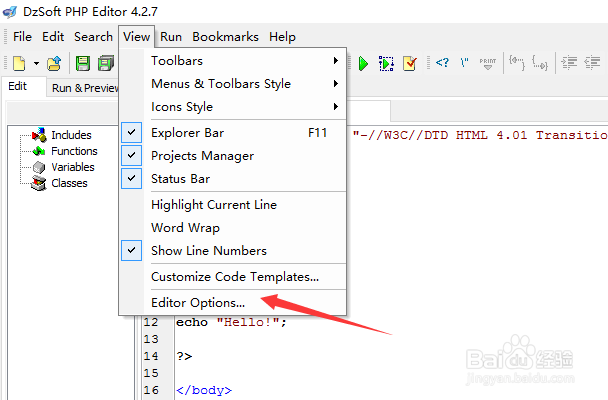
1、点击菜单中view菜单

DzSoft PHP Editor怎么关闭光标超出eof

2、弹出了下拉菜单选择为preference选项

DzSoft PHP Editor怎么关闭光标超出eof

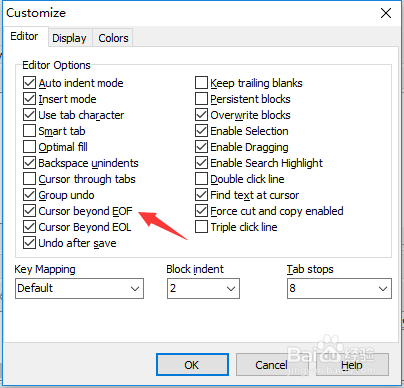
3、点击菜单中editor选项

DzSoft PHP Editor怎么关闭光标超出eof

4、去掉勾选cursor Beyond eof选项

DzSoft PHP Editor怎么关闭光标超出eof

5、去掉勾选cursor Beyond eof选项之后,点击ok

DzSoft PHP Editor怎么关闭光标超出eof
  • DzSoft PHP Editor怎么关闭启用搜索突出显示
  • DzSoft PHP Editor怎么设置使用制表符
  • DzSoft PHP Editor怎么关闭使用制表符
  • DzSoft PHP Editor怎么设置保存后撤销
  • DzSoft PHP Editor怎么关闭智能标签
  • 热门搜索
    什么花有毒 痤疮用什么药 中秋节有什么习俗 favorite是什么意思 鄙视是什么意思 热水器漏水是什么原因 最高学位是什么 投档线是什么意思 6月30日是什么星座 信任是什么