1、第一步:打开IIS,启用HTTP压缩服务
右击"网站"->"属性",选择"服务"。在"HTTP压缩"框中选中"压缩应用程序文件"和" 压缩静态文件",按需要设置"临时目录"和"临时目录的最大限制

2、第二步:启用web服务
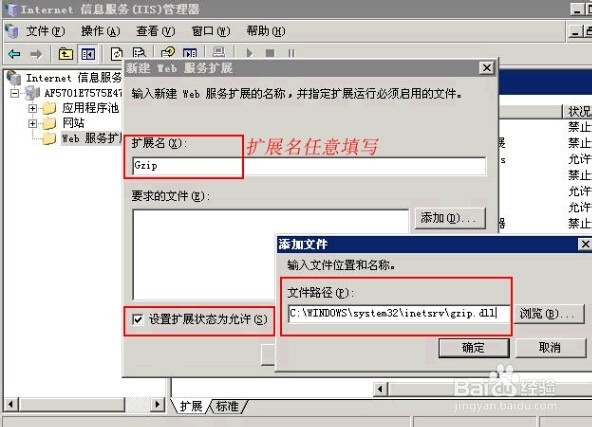
3、第三步:在服务中停止IIS Admin Service 服务
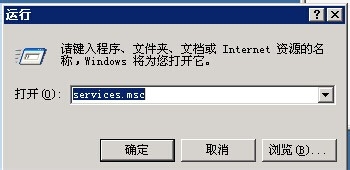
开始 > 运行中输入:services.msc
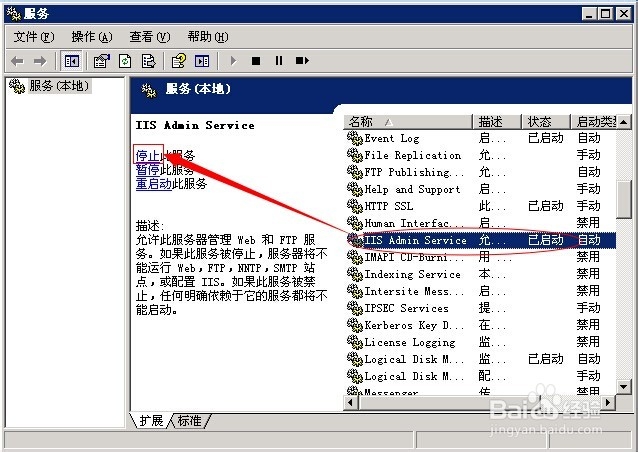
在服务里找到 IIS Admin Service 停止
4、第四步:修改MetaBase.xml
开始 > 运行中输入 c:\windows\system32\inetsrv,找到 MeteBase.xml,先备份,在修改。(有的服务器不需要修改此文件便可以使用)
搜索 Location ="/LM/W3SVC/Filters/Compression/gzip"
仔细核对下代码:
<IIsCompressionScheme Location ="/LM/W3SVC/Filters/Compression/deflate" HcCompressionDll="%windir%\system32\inetsrv\gzip.dll" HcCreateFlags="0" HcDoDynamicCompression="TRUE" HcDoOnDemandCompression="TRUE" HcDoStaticCompression="FALSE" HcDynamicCompressionLevel="0" HcFileExtensions="htm html txt" HcOnDemandCompLevel="10" HcPriority="1" HcScriptFileExtensions="asp dll exe" > </IIsCompressionScheme> <IIsCompressionScheme Location ="/LM/W3SVC/Filters/Compression/gzip" HcCompressionDll="%windir%\system32\inetsrv\gzip.dll" HcCreateFlags="1" HcDoDynamicCompression="TRUE" HcDoOnDemandCompression="TRUE" HcDoStaticCompression="TRUE" HcDynamicCompressionLevel="0" HcFileExtensions="htm html txt" HcOnDemandCompLevel="10" HcPriority="1" HcScriptFileExtensions="asp dll exe" > </IIsCompressionScheme>
替换成:
<IIsCompressionScheme Location ="/LM/W3SVC/Filters/Compression/gzip" HcCompressionDll="%windir%\system32\inetsrv\gzip.dll" HcCreateFlags="1" HcDoDynamicCompression="TRUE" HcDoOnDemandCompression="TRUE" HcDoStaticCompression="TRUE" HcDynamicCompressionLevel="10" HcFileExtensions="html css js htm xml txt" HcOnDemandCompLevel="10" HcPriority="1" HcScriptFileExtensions="php dll" > </IIsCompressionScheme> <IIsCompressionScheme Location ="/LM/W3SVC/Filters/Compression/deflate" HcCompressionDll="%windir%\system32\inetsrv\gzip.dll" HcCreateFlags="2" HcDoDynamicCompression="TRUE" HcDoOnDemandCompression="TRUE" HcDoStaticCompression="TRUE" HcDynamicCompressionLevel="10" HcFileExtensions="html css js htm xml txt" HcOnDemandCompLevel="10" HcPriority="1" HcScriptFileExtensions="php dll" > </IIsCompressionScheme>
然后在保存MeteBase.xml,保存好后再启动IIS。这样Gzip压缩就启用成功了。
