1、打开Authorware 7.0软件,进入它的主界面;

2、在图标中找到显示图标;
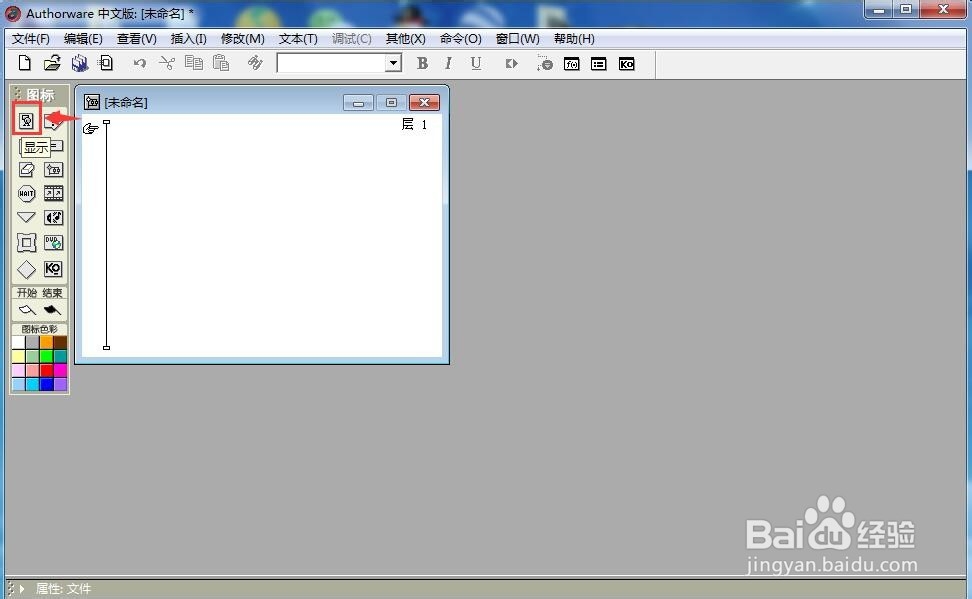
3、用鼠标将它拖放到流程线上,并重命名为背景;
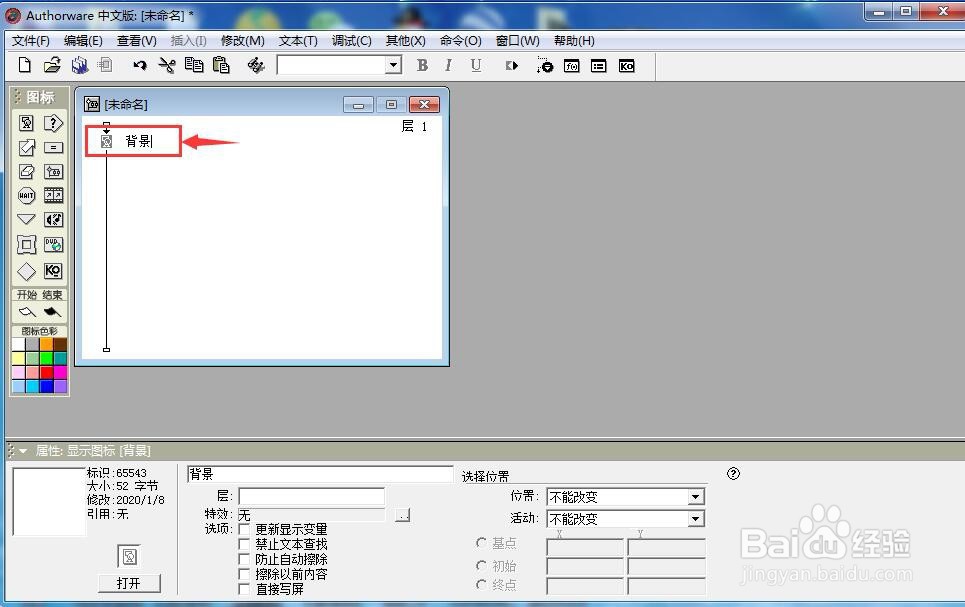
4、双击显示图标,打开演示窗口;

5、在工具栏中找到并点击导入;

6、找到准备好的背景图片,选中后按导入;

7、我们就在authorware中添加好了一个背景图。

1、打开authorware,添加显示图标到流程线上;
2、双击显示图标,打开演示窗口;
3、点击导入,选中备好的图片文件;
4、成功添加了一张背景图。
时间:2026-05-07 03:40:24
1、打开Authorware 7.0软件,进入它的主界面;
2、在图标中找到显示图标;
3、用鼠标将它拖放到流程线上,并重命名为背景;
4、双击显示图标,打开演示窗口;
5、在工具栏中找到并点击导入;
6、找到准备好的背景图片,选中后按导入;
7、我们就在authorware中添加好了一个背景图。
1、打开authorware,添加显示图标到流程线上;
2、双击显示图标,打开演示窗口;
3、点击导入,选中备好的图片文件;
4、成功添加了一张背景图。
