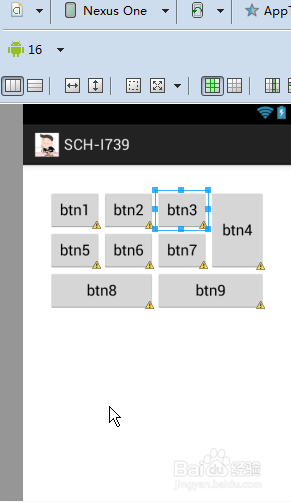
1、<?xml version="1.0" encoding="utf-8"?>
<GridLayout xmlns:android="http://schemas.android.com/apk/res/android"
android:layout_width="match_parent"
android:layout_height="wrap_content"
android:layout_margin="30dp"
android:columnCount="4" >
<Button
android:id="@+id/btn1"
android:layout_width="wrap_content"
android:layout_height="wrap_content"
android:text="btn1" />
<Button
android:id="@+id/btn2"
android:layout_width="wrap_content"
android:layout_height="wrap_content"
android:text="btn2" />
<Button
android:id="@+id/btn3"
android:layout_width="wrap_content"
android:layout_height="wrap_content"
android:text="btn3" />
<Button
android:id="@+id/btn4"
android:layout_width="wrap_content"
android:layout_height="wrap_content"
android:layout_rowSpan="2"
android:layout_gravity="fill"
android:text="btn4" />
<Button
android:id="@+id/btn5"
android:layout_width="wrap_content"
android:layout_height="wrap_content"
android:text="btn5" />
<Button
android:id="@+id/btn6"
android:layout_width="wrap_content"
android:layout_height="wrap_content"
android:text="btn6" />
<Button
android:id="@+id/btn7"
android:layout_width="wrap_content"
android:layout_height="wrap_content"
android:text="btn7" />
<Button
android:id="@+id/btn8"
android:layout_width="wrap_content"
android:layout_height="wrap_content"
android:layout_columnSpan="2"
android:layout_gravity="fill"
android:text="btn8" />
<Button
android:id="@+id/btn9"
android:layout_width="wrap_content"
android:layout_height="wrap_content"
android:layout_columnSpan="2"
android:layout_gravity="fill"
android:text="btn9" />
</GridLayout>
2、5·GridLayout网格布局
Android 4.0以上版本出现
可以实现合并行列的效果
android:columnCount="4" 显示4列,GridLayout属性
android:RowCount="4" 显示4行,GridLayout属性
android:layout_columnSpan 占用列的数目 内部控件属性 web -- colspan 占用几列 td属性
android:layout_rowSpan 占用行的数目 内部控件属性 web -- rowspan 占用几行 td属性
android:layout_gravity 填充方式 内部控件属性 fill 填充满
gridlayout布局的三种构造方法
GridLayout() 一行一列
GridLayout(int rows, int cols) rows行 cols列
GridLayout(int rows, int cols, int hgap, int vgap) rows行 cols 列, 列间距hgap, 行间距vgap
GridLayout和TableLayout有啥不同?
TableLayout定义TableRow来呈现内容
GridLayout直接定义控件呈现内容
表格布局只能合并列不能合并行
网格布局既能合并列也能合并行

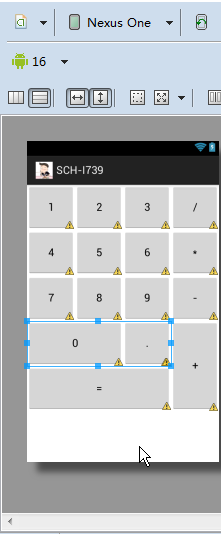
1、<?xml version="1.0" encoding="utf-8"?>
<LinearLayout xmlns:android="http://schemas.android.com/apk/res/android"
android:layout_width="match_parent"
android:layout_height="match_parent"
android:orientation="vertical" >
<LinearLayout
android:layout_width="match_parent"
android:layout_height="75dp"
android:orientation="horizontal" >
<Button
android:layout_width="match_parent"
android:layout_height="match_parent"
android:layout_weight="1"
android:text="1" />
<Button
android:layout_width="match_parent"
android:layout_height="match_parent"
android:layout_weight="1"
android:text="2" />
<Button
android:layout_width="match_parent"
android:layout_height="match_parent"
android:layout_weight="1"
android:text="3" />
<Button
android:layout_width="match_parent"
android:layout_height="match_parent"
android:layout_weight="1"
android:text="/" />
</LinearLayout>
<LinearLayout
android:layout_width="match_parent"
android:layout_height="75dp"
android:orientation="horizontal" >
<Button
android:layout_width="match_parent"
android:layout_height="match_parent"
android:layout_weight="1"
android:text="4" />
<Button
android:layout_width="match_parent"
android:layout_height="match_parent"
android:layout_weight="1"
android:text="5" />
<Button
android:layout_width="match_parent"
android:layout_height="match_parent"
android:layout_weight="1"
android:text="6" />
<Button
android:layout_width="match_parent"
android:layout_height="match_parent"
android:layout_weight="1"
android:text="*" />
</LinearLayout>
<LinearLayout
android:layout_width="match_parent"
android:layout_height="75dp"
android:orientation="horizontal" >
<Button
android:layout_width="match_parent"
android:layout_height="match_parent"
android:layout_weight="1"
android:text="7" />
<Button
android:layout_width="match_parent"
android:layout_height="match_parent"
android:layout_weight="1"
android:text="8" />
<Button
android:layout_width="match_parent"
android:layout_height="match_parent"
android:layout_weight="1"
android:text="9" />
<Button
android:layout_width="match_parent"
android:layout_height="match_parent"
android:layout_weight="1"
android:text="-" />
</LinearLayout>
<LinearLayout
android:layout_width="match_parent"
android:layout_height="150dp"
android:orientation="horizontal" >
<LinearLayout
android:layout_width="match_parent"
android:layout_height="match_parent"
android:layout_weight="1"
android:orientation="vertical" >
<LinearLayout
android:layout_width="match_parent"
android:layout_height="match_parent"
android:layout_weight="1"
android:orientation="horizontal" >
<Button
android:layout_width="match_parent"
android:layout_height="match_parent"
android:layout_weight="1"
android:text="0" />
<Button
android:layout_width="match_parent"
android:layout_height="match_parent"
android:layout_weight="2"
android:text="." />
</LinearLayout>
<Button
android:layout_width="match_parent"
android:layout_height="match_parent"
android:layout_weight="1"
android:text="=" />
</LinearLayout>
<Button
android:layout_width="match_parent"
android:layout_height="match_parent"
android:layout_weight="3"
android:text="+" />
</LinearLayout>
</LinearLayout>